I built a design team that lives in my terminal
The best thing I ever designed had three people arguing about it before I touched a pixel.
PMs who knew the constraints. Engineers who knew what was feasible. They didn’t tell me how to design. They brought context I didn’t have.
Vibe-coding flips that. You go from idea to product alone. Full creative control. Part of me loves it. It’s fast, nobody’s scheduling a review meeting. But I kept shipping pages that looked the same. Generic designs that you’ve definitely seen somewhere before. My blind spots had blind spots.
And AI didn’t help. Every time I asked Claude to make something look better, I got the same page back. Dark background, white text, blue accent, centered hero. You know the look. That “AI made this” starter kit. Technically correct. Creatively dead.
So I built a team. Four AI agents that run inside Claude Code. I taught them how to push back on each other’s output - flag accessibility issues, challenge color choices, question section order. How to write a full design brief before touching code. They’re free.
The team
The team has four agents. Each one has a specialty. A shared protocol tells them how to collaborate.
Brand Agent is the strategist. Before anyone writes a line of CSS, this one figures out who you’re building for, what the personality should be, and what words to use. It runs discovery rounds - asks you questions you’d hear in a real branding workshop. Audience, positioning, voice. Faster than hiring an agency, but it’s still a process - you need to think about your answers. This one took the longest to get right because brand discovery is messy by nature. Getting the timing right took the most iteration - too many questions and you lose patience, too few and the brand is shallow. It also generates brand elements - not just copy, but actual SVGs, CSS animations, stuff you can paste into code.
UX Agent is the flow planner. Maps out sections, user journeys, conversion mechanics. Makes sure the page makes sense before it looks pretty. It checks accessibility standards, how much the page asks your brain to process, and whether your call to action is where people will actually see it.
Visual Agent handles the look. Typography, color, spacing, motion, dark mode. If you’re not a designer, it takes the creative lead and proposes a full direction: color palette, font pairing, spacing scale, motion behavior. If you are a designer, it presents options and lets you call the shots. Either way, it works in exact values - font sizes, spacing scales, animation timing, color ratios.
Then there’s UI Agent. Component structure, layout systems, accessibility patterns, design tokens (the spacing, color, and size values that keep the design consistent). It decides how the page is built and enforces that every component handles all states: empty, loading, error, the works.
See it in action
I used these agents to build a landing page for an F1 dashboard side project called GridBox. Here’s the whole process, start to finish.
My prompt was: Run Design Agents, create me a landing page about my project, here you have screenshots (use them as they are). One sentence. The system reads your project first. What exists, what phase you’re in, what’s missing. Then it starts launching agents.
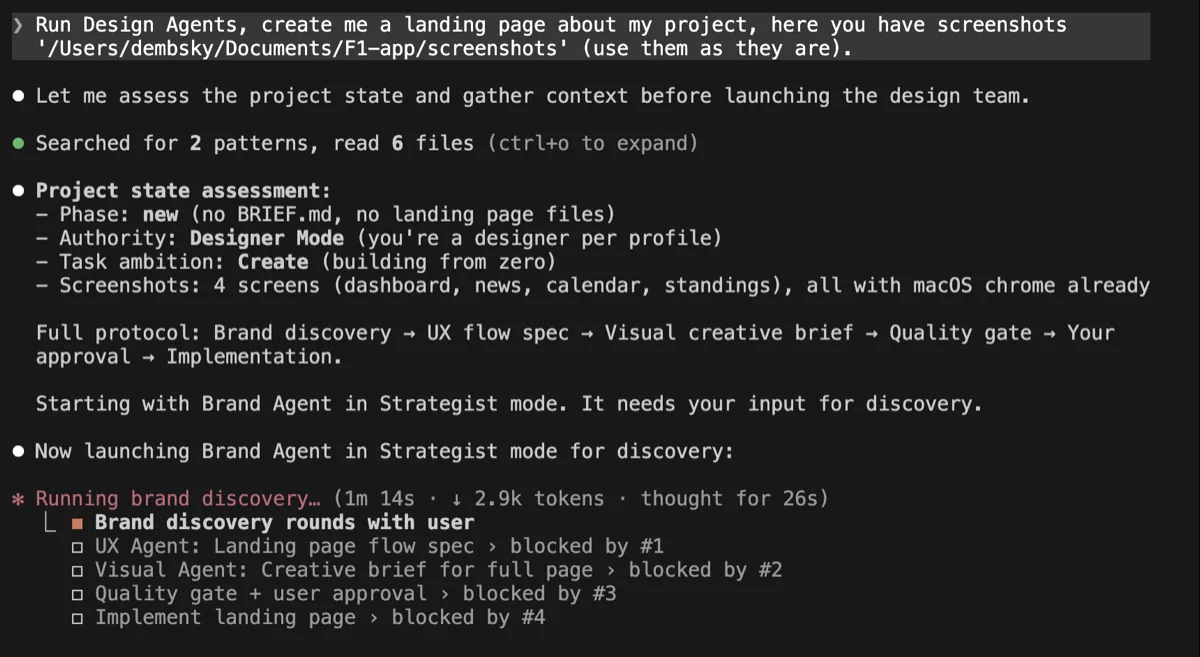
Brand Agent goes first and asks questions. Who’s the audience? What’s the positioning? What tone? You pick answers from a form instead of typing paragraphs.
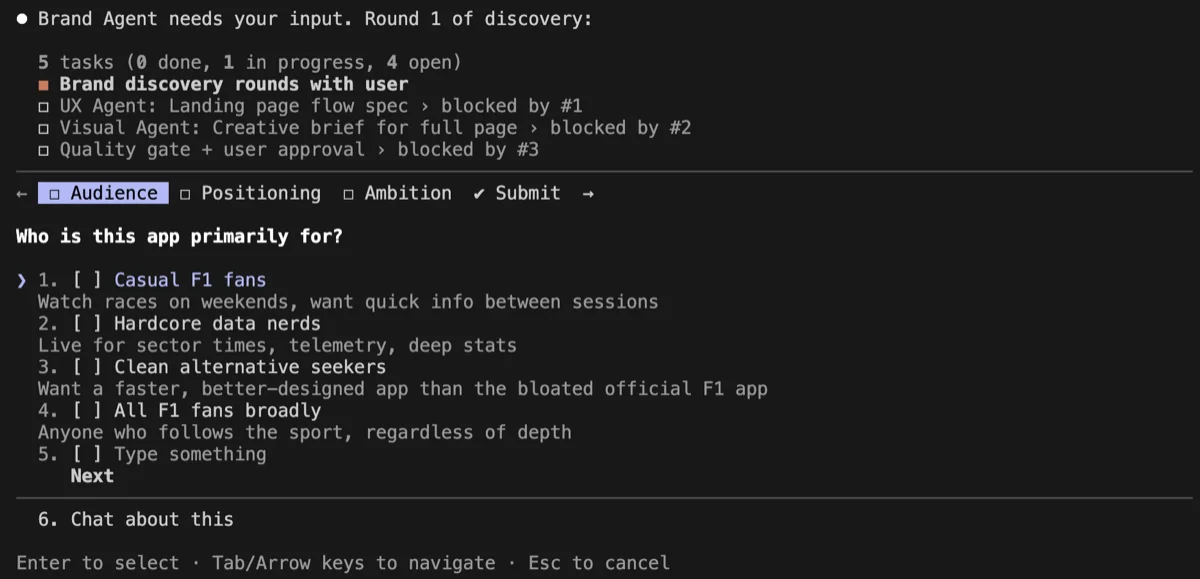
It happens in rounds. Audience and positioning first.
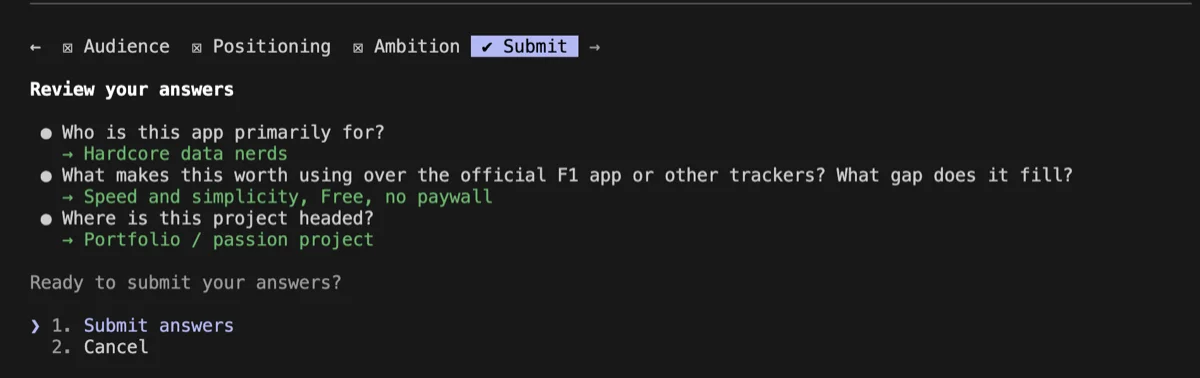
Then voice and personality. What brands do you respect? What keywords describe your product? These answers shape everything the agents produce next.
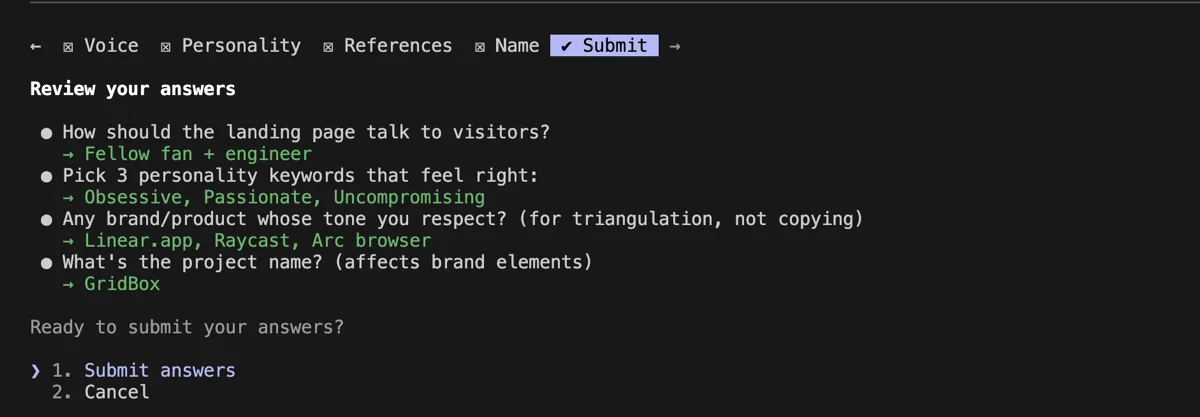
Once discovery is done, things speed up. UX Agent builds the section map while Brand Agent writes copy. They work at the same time. Visual Agent waits for both, then proposes a full creative direction.
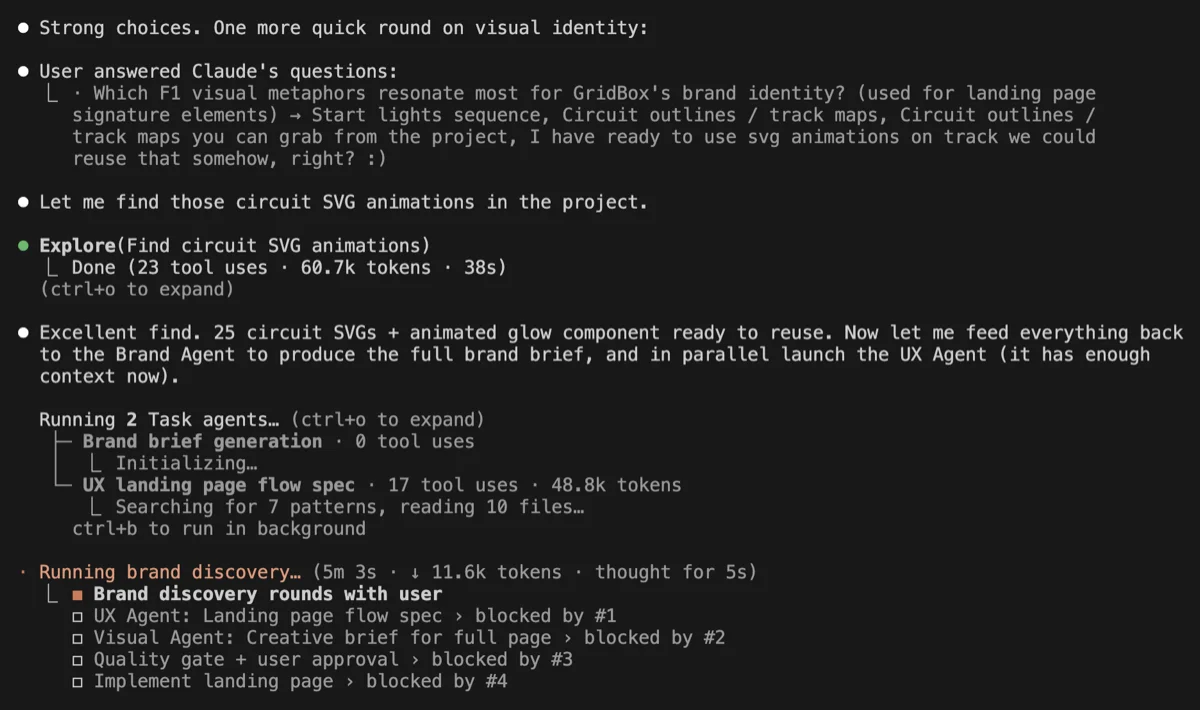
Before you see anything, there’s a quality gate. Are there brand elements with working code? Is there at least one thing that doesn’t look like every other landing page? If the brief is generic, it goes back. Then the complete brief shows up - every section with exact typography, colors, spacing, and motion values. You approve, adjust, or reject.
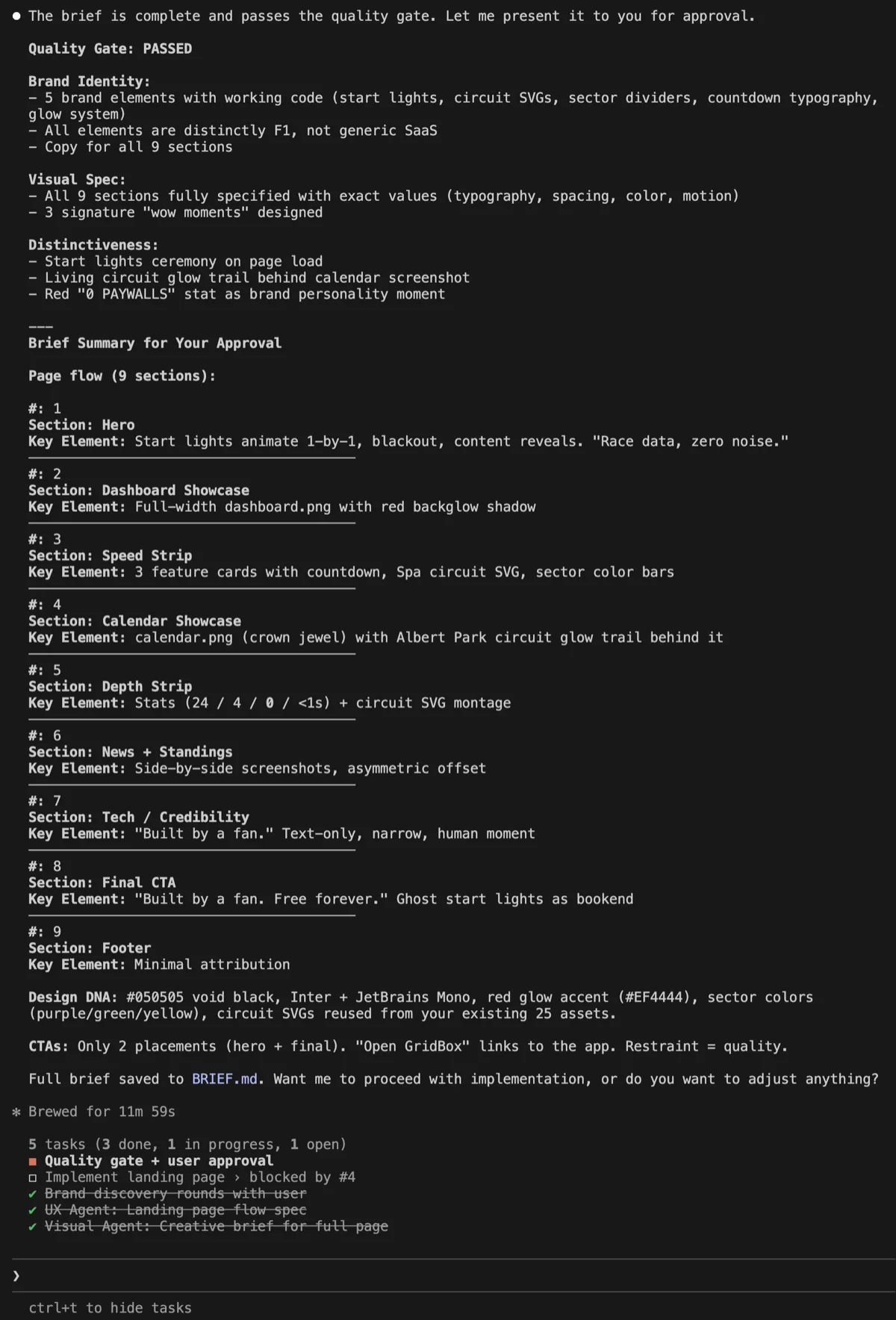
The brief can get long. Depending on your prompt and how many sections the agents plan out, you might be scrolling for a while. It’s a complete design spec, not a summary. Read it before you approve.
Once approved, it gets saved as BRIEF.md in your project folder and Claude builds the page following the spec.
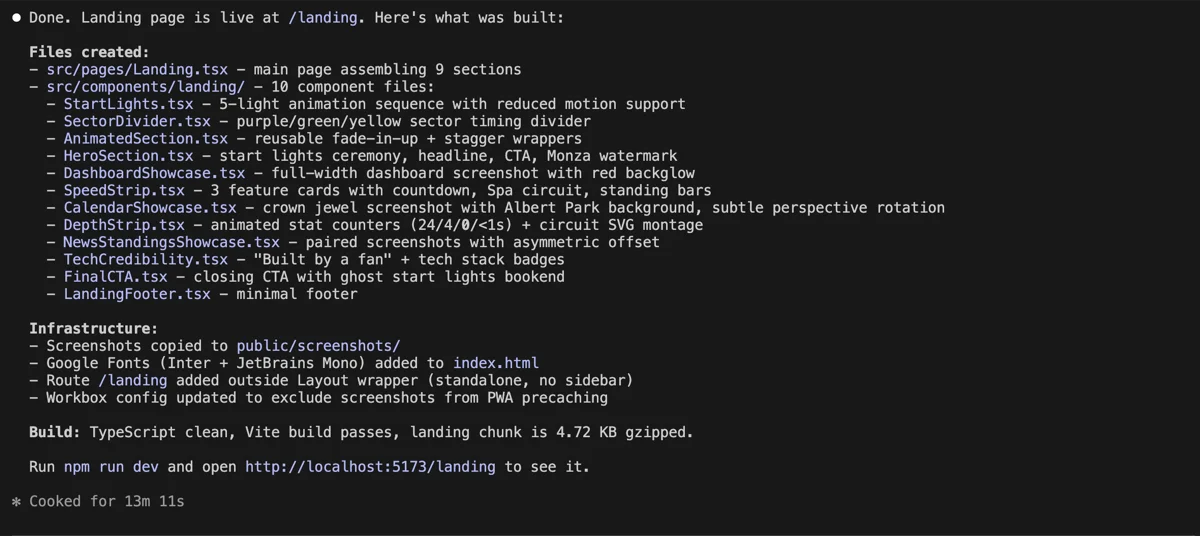
And here’s the result. This is what the agents produced on their own, zero manual tweaking:
After design agents only - start lights that animate on load, copy that sounds like it was written by someone who watches F1, and a dark theme that makes sense instead of the default AI dark mode.
Then I kept going. Iterating. Consulting the agents on every decision. Pushing the visual direction further:
After design agents + designer work - too many animations? Yes, the hero is absolutely over the top. But so is the whole landing page, and I love it. The agents gave me the starting point. Brand strategy, flow logic, visual rationale. I took it and ran way too far. Throughout the process I kept going back to them: “Does this still feel on-brand?” “Is this scroll rhythm working?” “Too much motion here?”
They gave me brand strategy, section specs, and copy. I shaped it from there. Next time you open the project, they find the existing BRIEF.md and pick up where you left off.
Working with a single agent
You don’t always need the full team. Sometimes you just want one opinion.
I do this constantly. Ask the brand agent if my landing page copy sounds like it was written by three different people. Have the visual agent look at a hero section - it once told me my font size ratio between the H1 and body text was 2.8:1 when it should be closer to 3.5:1. That’s the kind of detail you miss at 6 AM on a Sunday. Run the UX agent on a checkout flow before you ship it.
Single agents are great for quick gut checks. The full team is for building a new page or doing a serious redesign.
How to install
These agents run in Claude Code. That means you need the terminal. If you’re already vibe-coding, you’re good. If not, I wrote a separate post about how to get Claude Code running in VS Code.
Once Claude Code works, there are two ways to install.
Easy mode
This is what I do. Zero terminal commands.
Download the kit from GitHub or grab the zip from the bottom of this page. Unzip it. Open VS Code, open the terminal, type claude, hit Enter. Now drag the entire unzipped folder straight into the Claude Code conversation and say something like “install these design agents.”
Claude will read the README, figure out what goes where, and ask you for permission before copying each file. It’ll want to put agents in ~/.claude/agents/, the orchestration rule in ~/.claude/rules/, and update your ~/.claude/CLAUDE.md config. Just say yes to everything. If you don’t have a CLAUDE.md file yet, Claude will ask if it should create one. Let it.
New session, done.
Manual mode
If you prefer knowing exactly what’s happening:
Download the kit from GitHub or the bottom of this page.
Unzip it. You’ll see this:
design-agents-kit/ agents/ the 4 agent files rules/ how they collaborate claude-md-snippet.mdCopy the files where Claude finds them:
cp agents/*.md ~/.claude/agents/cp rules/design-team.md ~/.claude/rules/Tell Claude the agents exist. Open ~/.claude/CLAUDE.md in any text editor (create the file if you don’t have one) and paste the content from claude-md-snippet.md. This is the config file that Claude reads at the start of every session.
Start a new Claude Code session. Done. If things act weird, close VS Code and reopen it. The universal fix for everything.
Either way, no npm install. No dependencies. No build steps. These are markdown files that tell Claude how to approach design.
These only work in Claude Code. The orchestration - agents launching other agents, working in parallel, quality gates - that’s all terminal stuff. You could paste one agent’s instructions into a Claude Project on the web, but you’d lose the teamwork. And the teamwork is what makes them useful.
The honest part
These agents will give you a brand brief, page structure, visual specs, and motion values. Stuff that would take days to do manually. But they won’t replace taste. They won’t make every decision for you. And they definitely won’t ship something perfect on the first try.
Brand discovery, section mapping, spec writing - those are covered. You still need to look at the output and say “yes, this is right” or “no, push it further.” The brief is a starting point, not a finished product.
I use them on every project now. Not because they’re perfect, but because they’re better than typing “make it look good” and getting the same dark background, white text, blue accent page back.
Before you get excited
These agents eat tokens for breakfast. Four agents running in parallel, each doing deep analysis, generating briefs, writing copy - it adds up fast. The free tier of Claude won’t cut it. Pro might work for smaller tasks but I haven’t tested it. I run Max and depending on how hard I push them, they can drain the entire daily limit.
This is version 1.0. I use them daily and I’ll keep developing them, but treat this as an early release. Try it out, just know there are rough edges.
Get the kit
Drop the folder into your Claude Code setup, type design team: followed by whatever you’re building, and let them run.
The best work still comes from people arguing about it before you touch a pixel. Even if those people are markdown files in your terminal.